


Prime ID Scanner — Desktop ID Verification
Turn a PC or Mac into an ID check security desk or kiosk. Scan passports, driver licenses, and IDs with a USB scanner or webcam. Validate customer identities in seconds — at the front desk, in retail, or at the gate.
- Windows + macOS
- USB Scanner or Webcam
- Built-In Fake ID Detection
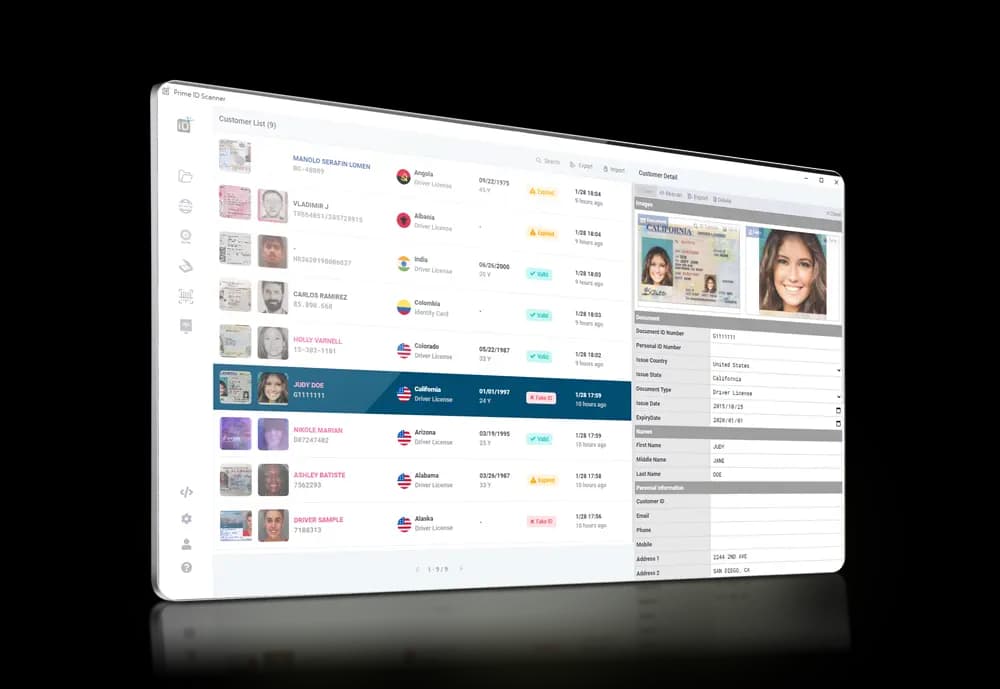
From Installer to First Verified ID — Three Steps
No SDK to wire up, no backend to host. Prime ID Scanner is a self-contained desktop app — install it, point it at a camera or document scanner, and you're verifying real customers minutes later. The base app is free to download; scans draw on your ID Analyzer credits the same as any other product on the platform.
- Reads driver licenses, passports, and ID cards from 200+ countries
- Built-in reference DB flags common forgery patterns instantly
- Every scan saved to a searchable local customer database
- Runs unattended in kiosk mode, or staffed at the front desk
Install on Windows or Mac
Download the .exe or .dmg installer. Setup wizard configures the app in a couple of minutes.
Connect a Capture Device
Plug in a webcam, document scanner, flatbed, or barcode reader. Prime auto-detects supported devices.
Scan, Verify, Export
OCR pulls the fields, the reference DB checks for forgery, and results export to CSV, JSON, or your CRM.

Identity Software for Every Front Desk
One desktop app that swaps in for your manual ID-checking process — bar, hotel, dispensary, gate.
Visual OCR
Pulls fields from passports, driver licenses, and ID cards. Exports as CSV or JSON.
Fake ID Check
Auto authenticity check against the built-in reference DB, with manual side-by-side review.
Face Verification
Live selfie capture compared against the ID portrait in real time.
Kiosk Mode
Touchscreen-friendly self-service interface for unattended ID checks.
Multiple Capture Sources
Webcam, document scanner, flatbed, barcode/MRZ reader, or local file import.
Local Customer DB
Every scan persists to a queryable local database — a lightweight CRM on day one.
What Else Ships in the Box
Beyond the scan itself — the database, the reference catalog, the sync, the kiosk surface.
Data Analytics
Every scan lands in a local DB with searchable fields — your customer history without a separate CRM.
3,000+ Reference Documents
Built-in DB of issuing-authority specimens for instant authenticity check and side-by-side review.
Smart Sync
Auto-upload scans to ID Analyzer cloud, or push results into your existing CRM via webhook.
Self-Service Kiosk
Convert any PC or Mac into a touchscreen-friendly checkpoint with no staff required.

The Front-Desk Stack, in One Install
OCR, fake-ID detection, face match, customer DB, and the kiosk surface — bundled into one desktop app, ready for the bar at 9pm or the hotel lobby at noon.
Local Customer DB
Every scan persists to a queryable database on your own machine
Six Input Sources
Webcam, scanner, flatbed, barcode reader, files, URLs
Auto Sync to Cloud
Push every scan to ID Analyzer Vault when you want it
Kiosk Mode
Touchscreen UI for unattended ID checkpoints
01
Cut the Manual ID Check
Three seconds per scan instead of forty for an eyeball check
02
Catch Fakes the Eye Misses
3,000+ reference docs flag forgeries staff would never spot
03
Searchable Customer History
Every scan persists — query past visits, age, or document number
Where Prime ID Scanner Earns Its Spot at the Desk
Three settings where regulated access and ID verification overlap.
Bars, clubs, dispensaries — age verification at the door
Hotels and rentals — guest registration without a queue
Event check-in, security desks, building access control
Questions From the Install
Five questions that come up most often before teams roll Prime out across the front desk.
A Windows and macOS desktop app for identity verification. Scans and verifies driver licenses, passports, and ID cards with OCR data extraction, document authentication, and face matching — all running locally, with optional cloud sync to ID Analyzer.
Windows 10 or later, or macOS. 4 GB RAM minimum, 500 MB disk. A webcam covers face capture. Document scanners, flatbeds, and barcode/MRZ readers are auto-detected if you have them.
A self-service interface that lets users scan their own IDs without staff. Hotel check-ins, event registration, dispensary entry, age-gated venues — any scenario where someone walks up to a touchscreen.
Yes. The built-in reference database of 3,000+ documents catches the common forgery patterns. When you enable cloud sync, scans run against ID Analyzer's full forensic models for the failure modes the local DB misses.
The base app is free to download. Document authentication, face verification, kiosk mode, and cloud sync require an ID Analyzer account — scans consume API credits the same as any other product on the platform.
Related Products & Solutions

Run Prime at the Front Desk Tonight
Free download for Windows and macOS. Pair with an ID Analyzer account for cloud sync and the full forensic check stack.